

- Регистрация
- 17 Фев 2018
- Сообщения
- 41,813
- Реакции
- 0
- Баллы
- 36
Ofline
The Command Palette, Keyboard Manager, and CursorWrap features just got even better.

Image: Jon Martindale / IDG
Summary created by Smart Answers AI
The March update for Windows PowerToys is now available. Microsoft has begun rolling out PowerToys 0.98, which includes improvements and new features for the Command Palette as well as a new look for the editing menu in Keyboard Manager.

Microsoft
The big news in this update is the new Command Palette Dock feature. You can now add your favorite commands to a dock that’s pinnable to any side of the screen. Microsoft says the Command Palette is now also faster and supports transparent windows.
Microsoft
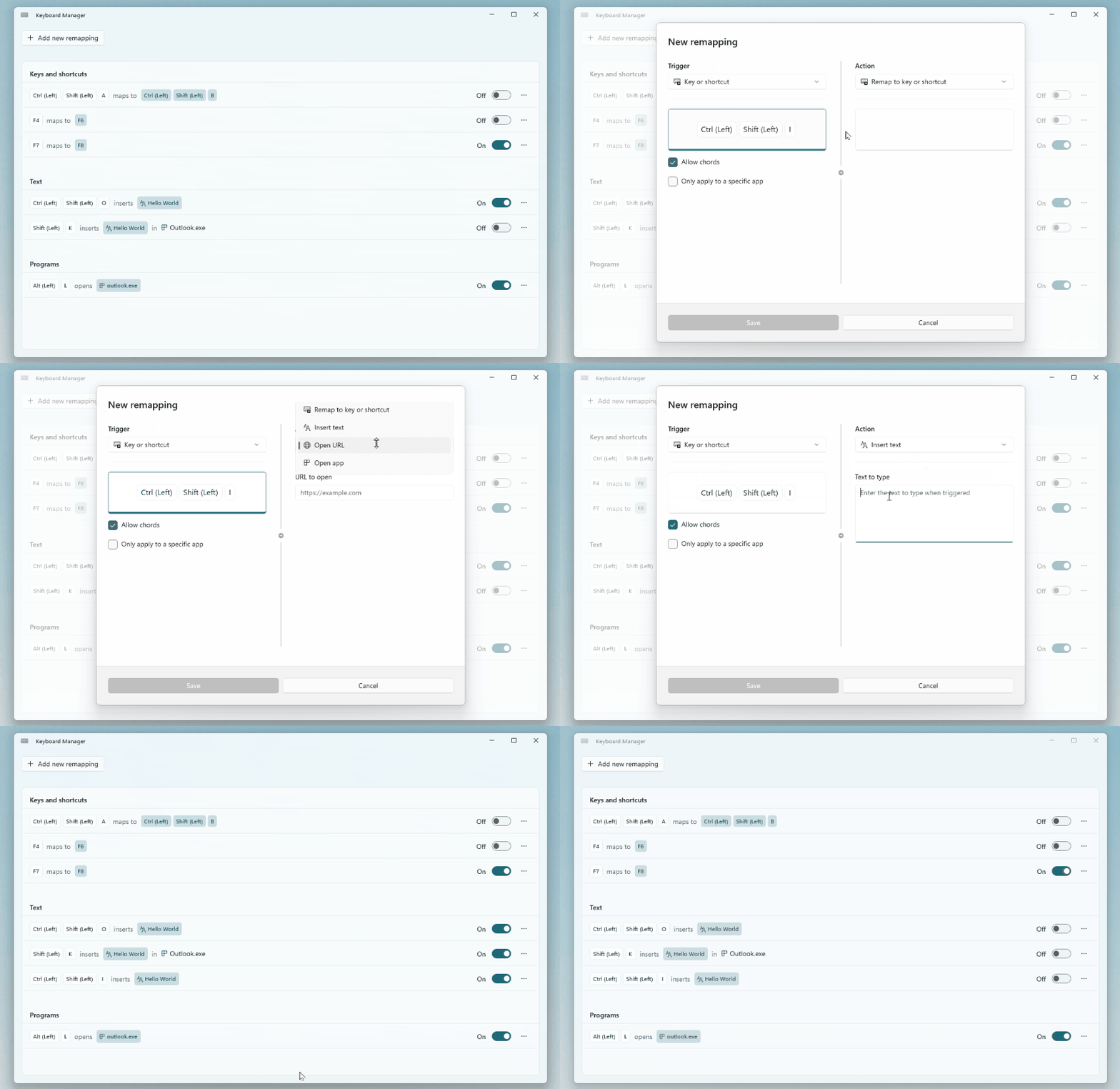
Microsoft says its has rebuilt the editing mode in Keyboard Manager from the ground up, to make it easier to improve in the future. It should now be easier to remap keys and create keyboard shortcuts in the tool, and you should now be able to quickly disable the various changes. It should now also be possible to launch and close Keyboard Manager via a shortcut in the Command Palette.
The CursorWrap mouse tool, which launched back in January, also got a major update. The tool should now work better for users with multiple monitors: you can automatically disable the tool if only one monitor is connected, and you can configure the wrap function to work only when you hold down the Ctrl or Shift keys.
Further reading: Useful Windows PowerToys features to start using
This article originally appeared on our sister publication PC för Alla and was translated and localized from Swedish.
Kristian is passionate about gadgets and gaming and mainly writes news for our sister sites, M3 and PC for Alla. He also tests products, mainly game accessories, and translates articles from the Foundry network.
Image: Jon Martindale / IDG
Summary created by Smart Answers AI
In summary:
- PCWorld reports that Microsoft’s PowerToys 0.98 update delivers major improvements to three core tools for enhanced Windows productivity.
- The Command Palette now features a pinnable dock for favorite commands, faster performance, and transparent window support.
- Keyboard Manager received a redesigned editing interface for easier key remapping, plus Command Palette shortcut integration for quick access.
The March update for Windows PowerToys is now available. Microsoft has begun rolling out PowerToys 0.98, which includes improvements and new features for the Command Palette as well as a new look for the editing menu in Keyboard Manager.
Microsoft
The big news in this update is the new Command Palette Dock feature. You can now add your favorite commands to a dock that’s pinnable to any side of the screen. Microsoft says the Command Palette is now also faster and supports transparent windows.
Microsoft
Microsoft says its has rebuilt the editing mode in Keyboard Manager from the ground up, to make it easier to improve in the future. It should now be easier to remap keys and create keyboard shortcuts in the tool, and you should now be able to quickly disable the various changes. It should now also be possible to launch and close Keyboard Manager via a shortcut in the Command Palette.
The CursorWrap mouse tool, which launched back in January, also got a major update. The tool should now work better for users with multiple monitors: you can automatically disable the tool if only one monitor is connected, and you can configure the wrap function to work only when you hold down the Ctrl or Shift keys.
Further reading: Useful Windows PowerToys features to start using
This article originally appeared on our sister publication PC för Alla and was translated and localized from Swedish.
Author: Kristian Kask, Contributor, PCWorld
Kristian is passionate about gadgets and gaming and mainly writes news for our sister sites, M3 and PC for Alla. He also tests products, mainly game accessories, and translates articles from the Foundry network.