

- Регистрация
- 17 Фев 2018
- Сообщения
- 41,813
- Реакции
- 0
- Баллы
- 36
Ofline
From premium performers to budget-friendly gems, we’ve tested the top Chromebooks to help you choose the perfect model.


Image: IDG / Ashley Biancuzzo
If you’re in the market for an affordable laptop, you can’t really get much better than a Chromebook. They’re fast, easy to use, and often cost less than traditional Windows laptops. You can even stream games on some models. That said, we focused on the ones that get the basics right. We’re specifically looking at ones with strong performance, durable design, and long battery life. Every pick on this list was tested hands-on, too.
If you decide that you’d prefer a Windows laptop, check out PCWorld’s roundup of the best laptops available today.
Why you should trust us: It’s in our name! PCWorld prides itself on laptop experience and expertise. We’ve been covering PCs since 1983, and we now review more than 70 laptops every year. All of the picks below have been personally tested and vetted by our experts, who’ve applied not only performance benchmarks but rigorous usability standards. We’re also committed to reviewing PC laptops at every price point to help you find a machine that matches your budget.
Best Prices Today:
Retailer
Price

$379
View Deal
eBay
$449
View Deal
Price comparison from over 24,000 stores worldwide
Product
Price
Price comparison from Backmarket
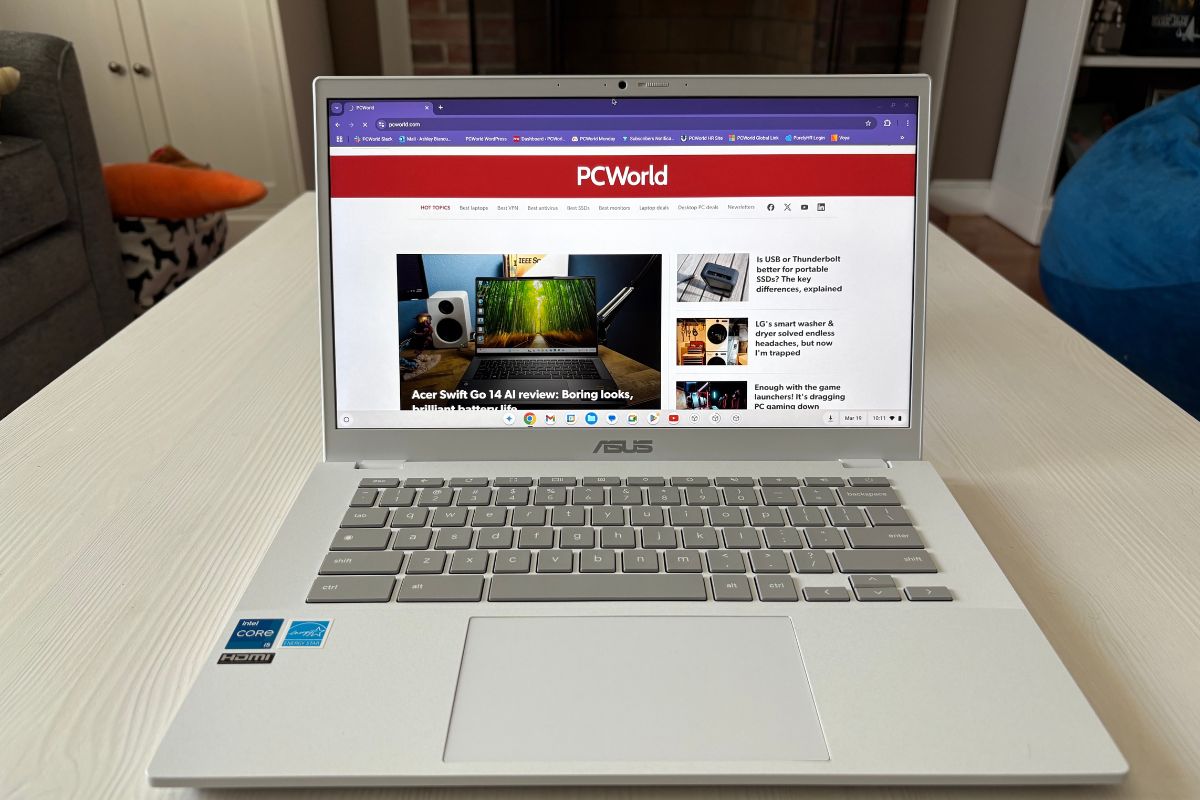
If you want a Chromebook that can do it all, the Asus Chromebook Plus CX34 is it. The Intel Core i5 keeps everything running smooth–streaming, school work, or juggling a bunch of tabs. And the ports? You’ve got USB-C, USB-A, HDMI, and a headphone jack, which means you can kiss the dongle life goodbye.
It’s not all sunshine, though. The 16:9 screen can feel cramped if you’re used to roomier displays, and while 13 hours of battery life sounds nice on paper, others last longer. Not a deal breaker, but if screen space or all-day power is at the top of your list, you might want to look elsewhere.
Read our full Asus Chromebook Plus CX34 review
Best Prices Today:
Retailer
Price
eBay
$159
View Deal

$159
View Deal

$229
View Deal
Price comparison from over 24,000 stores worldwide
Product
Price
Price comparison from Backmarket
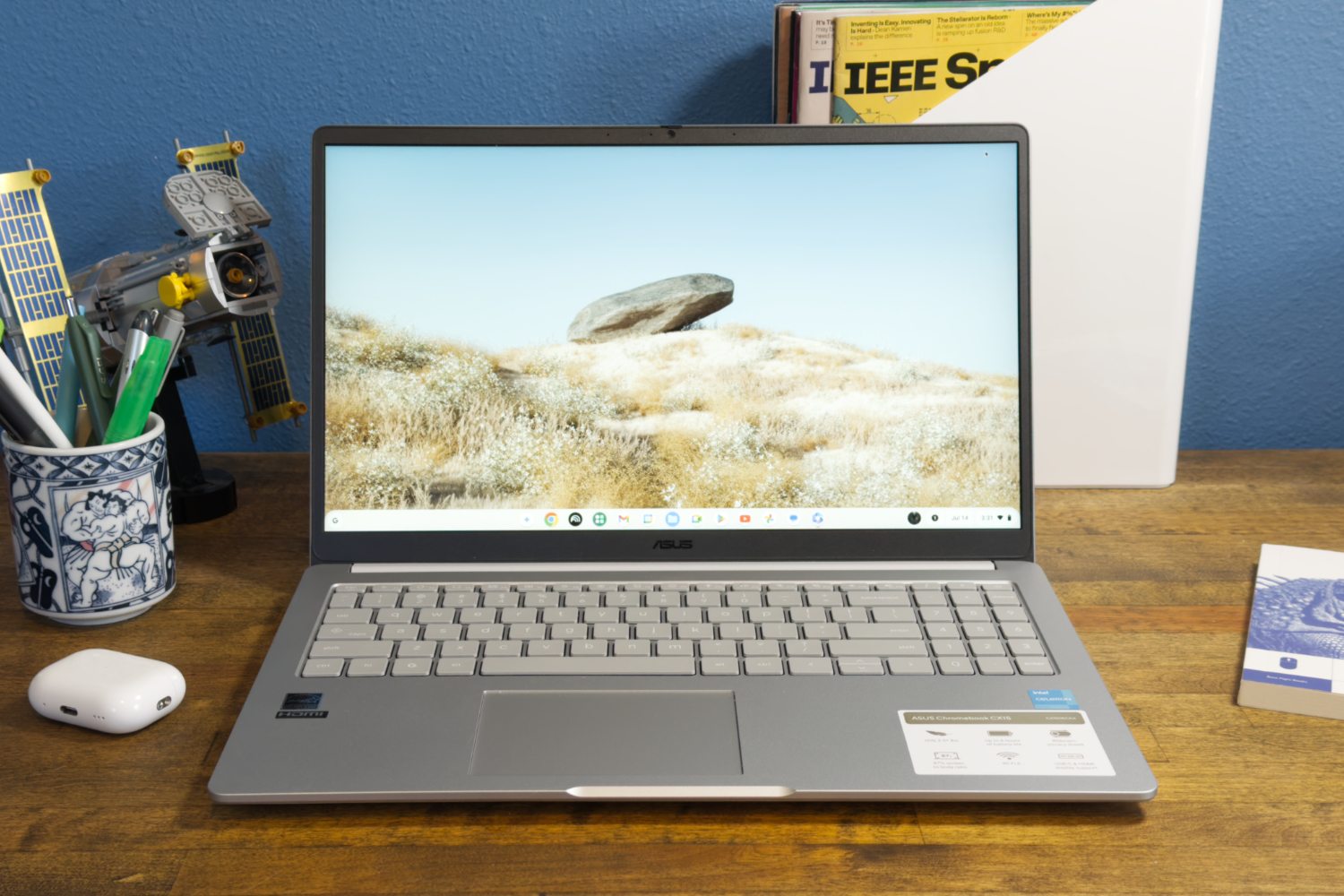
Need a reliable laptop for under $200? The CX15 is totally worth a look because it’s great for anyone that mostly browses the web and watches YouTube videos. The spacious 15.6-inch 1080p display and roomy keyboard also make it feel more premium than you’d expect at this price point. For daily tasks, it really gets the job done–you can’t say that about too many machines in this range.
You’re not going to get blazing fast performance here and that’s entirely OK. The Intel Celeron N4500 processor offers enough pep to get you through lighter workloads, but you may see some lag with heavier multitasking. Battery life is pretty darn good at around 10 hours, though we’ve seen other Chromebooks that last longer.
Still, for what you pay, the CX15 is a surprising little machine.
Read our full Asus Chromebook CX15 review
Best Prices Today:
Retailer
Price
$749
View Deal
Lenovo
$749.99
View Deal
Price comparison from over 24,000 stores worldwide
Product
Price
Price comparison from Backmarket
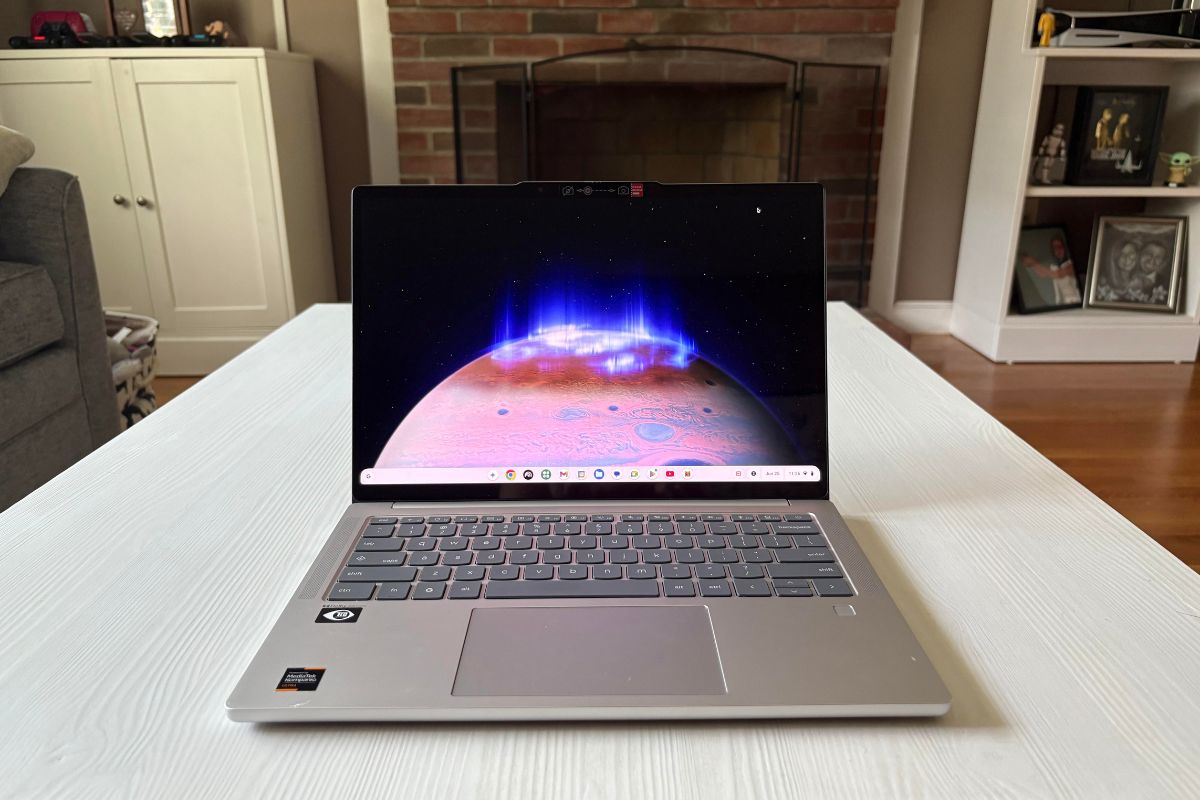
If you’ve been looking for a high-end Chromebook, the Lenovo Chromebook Plus 14 is totally worth your consideration—it’s a big step up from the usual budget fare. It’s got a 14-inch 1920×1200 OLED touchscreen and the colors really pop. The model we tested came loaded with 16GB of RAM and 256GB of UFS storage, so it handles a ton of tabs, Docs, YouTube, whatever you throw at it. And the MediaTek Kompanio Ultra 910 chip (plus a tiny Neural Processing Unit) makes everything feel snappy.
The 2.78-pound aluminum chassis is also super light to carry around, and the battery will last you about 19 hours as long as you’re conservative with the brightness level.
The Lenovo Chromebook Plus 14 is almost the complete package, but we did have a couple of minor nitpicks. The function keys are really small and they pick up fingerprints like nobody’s business. But, again, those are tiny complaints. If you want a Chromebook that looks and feels nicer than the budget crowd, this is the one to pick.
Read our full Lenovo Chromebook Plus 14 review
These Chromebooks didn’t crack our top picks list, but they’re still worth a look.
The Acer Chromebook Spin 315 is comfy to type on and handles the basics just fine, though the big bezels and limited charging options hold it back. We also checked out the Asus Chromebook Plus CX14, which performs better than models with Celeron CPUs.
The PCWorld team puts each and every laptop through a series of benchmarks that test GPU and CPU performance, battery life, and so on. The idea is to push the laptop to its limits and then compare it against others we’ve tested. Due to the cloud-based nature of Chromebooks, they go through a series of web-based tests. It wouldn’t be fair or possible to run the same kinds of tests on a Chromebook as we use on laptops because they exclusively run a completely different operating system.
For a more thorough explanation of our testing procedures, check out how PCWorld tests laptops.
Hi, I’m Ashley Biancuzzo, and I oversee all laptop and Chromebook coverage at PCWorld. While you’ll see me review Chromebooks on occasion, I’m also really into the broader world of consumer tech. I spend a lot of time writing and thinking about where laptops are headed–from AI and sustainable designs to long-term trends. When I’m not deep in the world of tech, you’ll probably find me gaming, getting lost in a good book, or chilling with my rescue greyhound, Allen.
If you want something like a Windows or MacBook but cheaper, check out a Chromebook. Just keep in mind they’ve got some limits. They’re good for simple, everyday stuff but they don’t have a lot of RAM or storage, so they’re not equipped to handle more resource-intensive tasks like gaming or video editing.
We’ve got a guide that compares Chromebooks and Windows laptops if you want to figure out what’s best for you.
Chromebooks only run Chrome OS, which is pretty easy to use. You can’t put Windows or macOS on them — you’re stuck with Google’s setup.
Shoot for a mid-range Chromebook if you can. They cost anywhere in the $400 to $600 range and many of them come equipped with Intel Pentium, Intel Core i3, or AMD Ryzen 3 processors. These Chromebooks run the browser smoother. They’re the best deal for the price. The fancier ones sometimes come with Intel Core i5 or AMD Ryzen 5 chips, which are way more powerful. Then there’s the new Kompanio Ultra chips, which are more powerful and AI-ready.
Lots of Chromebooks come with just 4GB of RAM, which isn’t much. Since they’re all about the web, you need enough RAM to keep your tabs from lagging. If you can drop a bit more cash, you can grab a mid-range Chromebook with 8GB, which runs way smoother.
1.
PCWorld thinks the Asus Chromebook Plus CX34 is the best all-around Chromebook. It’s got a solid Intel Core i5 processor, lots of ports, and handles everyday stuff really well. Basically, it’s a great pick if you want a reliable Chromebook without breaking the bank.
2.
PCWorld’s pick for best budget Chromebook is the Asus Chromebook CX15. With a spacious 15.6-inch 1080p display and roomy keyboard, this Chromebook is comfortable to use and its Intel Celeron N4500 processor is able to handle daily tasks. If you’re after value, this Chromebook provides all the basics for less than $200.
3.
A Chromebook’s just a laptop that runs Google’s Chrome OS instead of Windows or Mac. It’s mostly for web stuff like Google Drive and YouTube. Regular laptops are more powerful and can handle pretty much anything.
4.
A Chromebook is a laptop that runs Google’s Chrome OS.

Ashley Biancuzzo manages all laptop and Chromebook coverage for PCWorld. She's been covering consumer tech since 2016, and her work has appeared on USA Today, Reviewed, Polygon, Kotaku, StarWars.com, and Nerdist. In her spare time, she enjoys playing video games, reading science fiction, and hanging out with her rescue greyhound.
Image: IDG / Ashley Biancuzzo
If you’re in the market for an affordable laptop, you can’t really get much better than a Chromebook. They’re fast, easy to use, and often cost less than traditional Windows laptops. You can even stream games on some models. That said, we focused on the ones that get the basics right. We’re specifically looking at ones with strong performance, durable design, and long battery life. Every pick on this list was tested hands-on, too.
If you decide that you’d prefer a Windows laptop, check out PCWorld’s roundup of the best laptops available today.
Why you should trust us: It’s in our name! PCWorld prides itself on laptop experience and expertise. We’ve been covering PCs since 1983, and we now review more than 70 laptops every year. All of the picks below have been personally tested and vetted by our experts, who’ve applied not only performance benchmarks but rigorous usability standards. We’re also committed to reviewing PC laptops at every price point to help you find a machine that matches your budget.
Asus Chromebook Plus CX34 – Best overall Chromebook
Pros
- Zippy processor performance
- Nice keyboard
- Wide array of connectivity options
- Chic design
Cons
- Battery life isn’t competitive
- Display’s 16:9 aspect ratio feels a little cramped
Best Prices Today:
Retailer
Price
$379
View Deal
eBay
$449
View Deal
Price comparison from over 24,000 stores worldwide
Product
Price
Price comparison from Backmarket
Who should buy the Asus Chromebook Plus CX34?
If you want a Chromebook that can do it all, the Asus Chromebook Plus CX34 is it. The Intel Core i5 keeps everything running smooth–streaming, school work, or juggling a bunch of tabs. And the ports? You’ve got USB-C, USB-A, HDMI, and a headphone jack, which means you can kiss the dongle life goodbye.
Asus Chromebook Plus CX34: Further considerations
It’s not all sunshine, though. The 16:9 screen can feel cramped if you’re used to roomier displays, and while 13 hours of battery life sounds nice on paper, others last longer. Not a deal breaker, but if screen space or all-day power is at the top of your list, you might want to look elsewhere.
Read our full Asus Chromebook Plus CX34 review
Asus Chromebook CX15 – Best budget Chromebook
Pros
- Good design with enjoyable keyboard
- Sharp 15.6-inch 1080p display
- Decent speakers
- Extremely inexpensive
Cons
- Small touchpad
- Slow dual-core processor
- 4GB RAM often holds it back
- Short battery life for a Chromebook
Best Prices Today:
Retailer
Price
eBay
$159
View Deal
$159
View Deal
$229
View Deal
Price comparison from over 24,000 stores worldwide
Product
Price
Price comparison from Backmarket
Who should buy the Asus Chromebook CX15?
Need a reliable laptop for under $200? The CX15 is totally worth a look because it’s great for anyone that mostly browses the web and watches YouTube videos. The spacious 15.6-inch 1080p display and roomy keyboard also make it feel more premium than you’d expect at this price point. For daily tasks, it really gets the job done–you can’t say that about too many machines in this range.
Asus Chromebook CX15: Further considerations
You’re not going to get blazing fast performance here and that’s entirely OK. The Intel Celeron N4500 processor offers enough pep to get you through lighter workloads, but you may see some lag with heavier multitasking. Battery life is pretty darn good at around 10 hours, though we’ve seen other Chromebooks that last longer.
Still, for what you pay, the CX15 is a surprising little machine.
Read our full Asus Chromebook CX15 review
Lenovo Chromebook Plus 14 – Best high-end Chromebook
Pros
- Lovely OLED display
- Surprisingly strong performance for a fanless Chromebook
- Loud, clear speakers
- Competitive battery life
Cons
- Hard-to-read function keys
- AI tools feel unnecessary in everyday use
Best Prices Today:
Retailer
Price
$749
View Deal
Lenovo
$749.99
View Deal
Price comparison from over 24,000 stores worldwide
Product
Price
Price comparison from Backmarket
Who should buy the Lenovo Chromebook Plus 14?
If you’ve been looking for a high-end Chromebook, the Lenovo Chromebook Plus 14 is totally worth your consideration—it’s a big step up from the usual budget fare. It’s got a 14-inch 1920×1200 OLED touchscreen and the colors really pop. The model we tested came loaded with 16GB of RAM and 256GB of UFS storage, so it handles a ton of tabs, Docs, YouTube, whatever you throw at it. And the MediaTek Kompanio Ultra 910 chip (plus a tiny Neural Processing Unit) makes everything feel snappy.
The 2.78-pound aluminum chassis is also super light to carry around, and the battery will last you about 19 hours as long as you’re conservative with the brightness level.
Lenovo Chromebook Plus 14: Further considerations
The Lenovo Chromebook Plus 14 is almost the complete package, but we did have a couple of minor nitpicks. The function keys are really small and they pick up fingerprints like nobody’s business. But, again, those are tiny complaints. If you want a Chromebook that looks and feels nicer than the budget crowd, this is the one to pick.
Read our full Lenovo Chromebook Plus 14 review
Other notable Chromebooks we’ve tested
These Chromebooks didn’t crack our top picks list, but they’re still worth a look.
The Acer Chromebook Spin 315 is comfy to type on and handles the basics just fine, though the big bezels and limited charging options hold it back. We also checked out the Asus Chromebook Plus CX14, which performs better than models with Celeron CPUs.
How we test Chromebooks
The PCWorld team puts each and every laptop through a series of benchmarks that test GPU and CPU performance, battery life, and so on. The idea is to push the laptop to its limits and then compare it against others we’ve tested. Due to the cloud-based nature of Chromebooks, they go through a series of web-based tests. It wouldn’t be fair or possible to run the same kinds of tests on a Chromebook as we use on laptops because they exclusively run a completely different operating system.
For a more thorough explanation of our testing procedures, check out how PCWorld tests laptops.
Who curated this article?
Hi, I’m Ashley Biancuzzo, and I oversee all laptop and Chromebook coverage at PCWorld. While you’ll see me review Chromebooks on occasion, I’m also really into the broader world of consumer tech. I spend a lot of time writing and thinking about where laptops are headed–from AI and sustainable designs to long-term trends. When I’m not deep in the world of tech, you’ll probably find me gaming, getting lost in a good book, or chilling with my rescue greyhound, Allen.
How to choose the best Chromebook
If you want something like a Windows or MacBook but cheaper, check out a Chromebook. Just keep in mind they’ve got some limits. They’re good for simple, everyday stuff but they don’t have a lot of RAM or storage, so they’re not equipped to handle more resource-intensive tasks like gaming or video editing.
We’ve got a guide that compares Chromebooks and Windows laptops if you want to figure out what’s best for you.
Key Chromebook features to consider
Operating system
Chromebooks only run Chrome OS, which is pretty easy to use. You can’t put Windows or macOS on them — you’re stuck with Google’s setup.
Processor
Shoot for a mid-range Chromebook if you can. They cost anywhere in the $400 to $600 range and many of them come equipped with Intel Pentium, Intel Core i3, or AMD Ryzen 3 processors. These Chromebooks run the browser smoother. They’re the best deal for the price. The fancier ones sometimes come with Intel Core i5 or AMD Ryzen 5 chips, which are way more powerful. Then there’s the new Kompanio Ultra chips, which are more powerful and AI-ready.
RAM
Lots of Chromebooks come with just 4GB of RAM, which isn’t much. Since they’re all about the web, you need enough RAM to keep your tabs from lagging. If you can drop a bit more cash, you can grab a mid-range Chromebook with 8GB, which runs way smoother.
FAQ
1.
What is the best Chromebook?
PCWorld thinks the Asus Chromebook Plus CX34 is the best all-around Chromebook. It’s got a solid Intel Core i5 processor, lots of ports, and handles everyday stuff really well. Basically, it’s a great pick if you want a reliable Chromebook without breaking the bank.
2.
What is the best cheap Chromebook?
PCWorld’s pick for best budget Chromebook is the Asus Chromebook CX15. With a spacious 15.6-inch 1080p display and roomy keyboard, this Chromebook is comfortable to use and its Intel Celeron N4500 processor is able to handle daily tasks. If you’re after value, this Chromebook provides all the basics for less than $200.
3.
What’s the difference between a Chromebook and a laptop?
A Chromebook’s just a laptop that runs Google’s Chrome OS instead of Windows or Mac. It’s mostly for web stuff like Google Drive and YouTube. Regular laptops are more powerful and can handle pretty much anything.
4.
What is a Chromebook?
A Chromebook is a laptop that runs Google’s Chrome OS.
Related content
- I switched from Windows PCs to Chromebooks and haven’t looked back
- 9 reasons why you should buy a Chromebook over a laptop
- A beginner’s guide to using a Chromebook
- Are Chromebooks good for gaming? No… but actually also yes
- Can Chromebooks get viruses? It’s complicated
- Lenovo’s new Chromebook has exclusive AI powers
- I’m a Chromebook power user. I swear by these 9 productivity tips
- 7 Chromebook features that make Google laptops ultra-secure
Author: Ashley Biancuzzo, Associate Editor, PCWorld
Ashley Biancuzzo manages all laptop and Chromebook coverage for PCWorld. She's been covering consumer tech since 2016, and her work has appeared on USA Today, Reviewed, Polygon, Kotaku, StarWars.com, and Nerdist. In her spare time, she enjoys playing video games, reading science fiction, and hanging out with her rescue greyhound.