

- Регистрация
- 17 Фев 2018
- Сообщения
- 41,813
- Реакции
- 0
- Баллы
- 36
Ofline
Getting out from under a mountain of AI? Sure, sign me up.

Image: gguy / Shutterstock.com
Summary created by Smart Answers AI
Can we admit that AI is actually surprisingly useful for email? And any additional tools to help manage our Outlook and email could actually be welcome?
Microsoft made a number of announcements on Monday, all geared toward adding AI to business apps. The most noteworthy addition is that it’s expanding its models from OpenAI to the technology behind Anthropic’s Claude, and working those in to Word, PowerPoint, and Excel. But it’s also tweaking Outlook (not with Claude, apparently) to let Copilot start accepting, rejecting, and slotting calendar invitations based upon a number of factors.
If you’re someone who remembers how Cortana could draft a quick email for you way back in Windows 10, you’ll be interested to know that Copilot’s chat option has now added that same capability, too.
In my book, it’s less of a trick to draft an email than it is to manage your time. Word has offered the ability to write and edit from scratch using AI for some time now, and Outlook has as well. The new additions appear to be a bit of back and forth — if you create a slide deck in PowerPoint using Copilot, for example, PowerPoint will create a full deck without the ability to tweak a slide using AI.
Microsoft
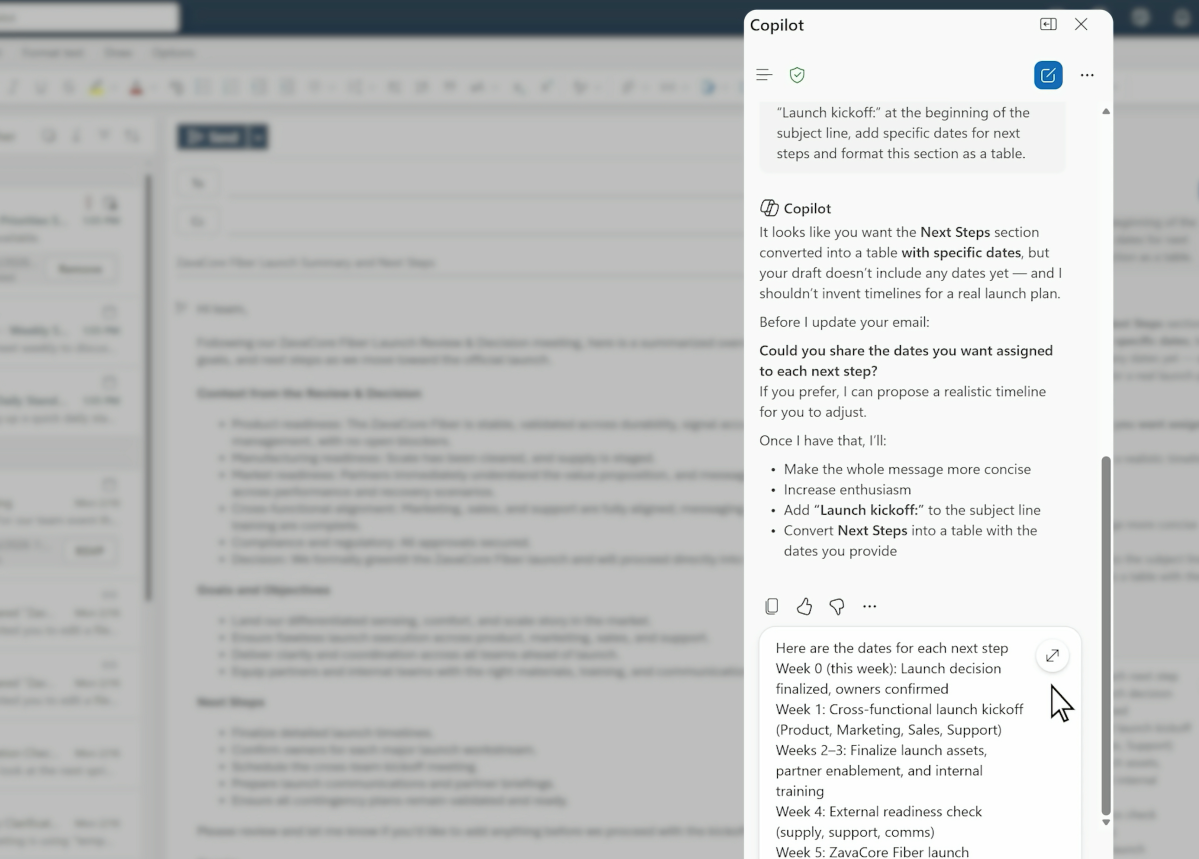
With Outlook, you now get the ability to draft an email, but then Copilot will collaboratively edit it with you: is it framed correctly? Does it include the correct information? Does it have the correct tone?( Of course, all of the editing and polishing might take as much time as actually writing the thing.) Microsoft is adding this to the “modern Outlook” experience today, for Windows, Web, and the mobile Outlook app, and the same goes for an email crafted in Copilot’s chat function.
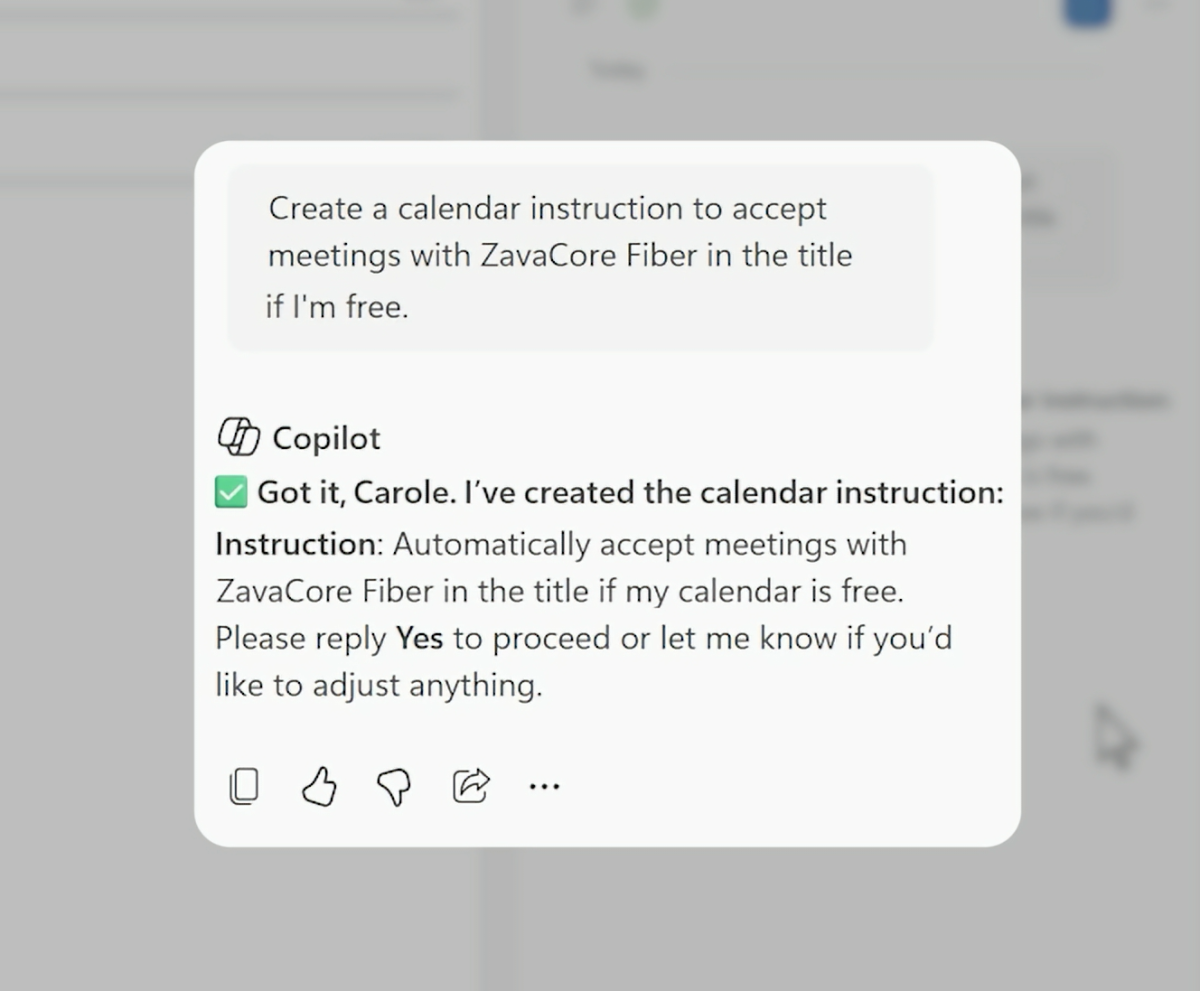
Outlook is also adding automated AI preferences based on rules that you set, via prompts like these:
It’s a good first start. Obviously, what you define as a rule via a prompt will help define how useful this new feature is. But one of the challenges I have is accepting a meeting time and/or location depending on a number of moving parts: other meetings, logistics, and so on. I don’t want to decline a meeting I simply can’t make at a given time; I might want to propose an alternative and try to reschedule it instead.
Microsoft
The Outlook AI preferences seem to automate the process of accepting or declining a meeting. However, a separate new feature addition, within Copilot Chat, allows you to solve this particular problem, according to a Microsoft blog post.
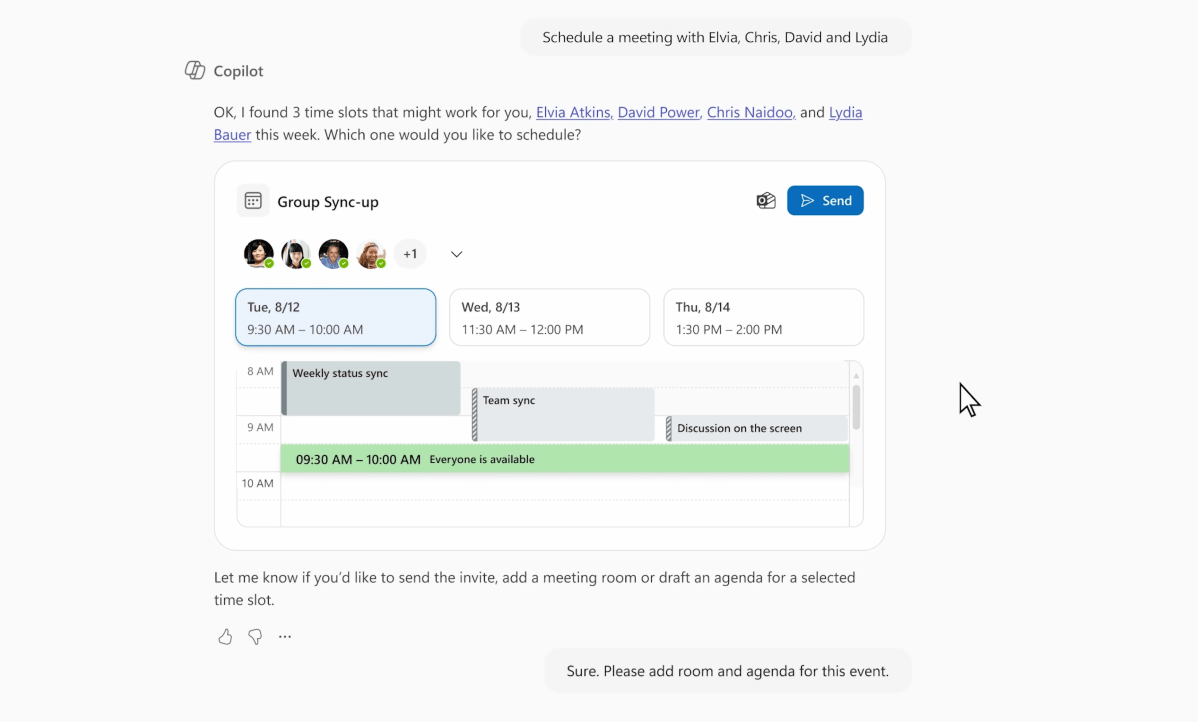
“In Copilot Chat, you can ask for a meeting and Copilot handles the logistics—availability, time options, and invite details—then shows you how each option fits on your Outlook calendar so you can confirm the one that works best,” Microsoft says.
Prompts like this should work: “Schedule 30 minutes with /name, /name, and /name next week to decide on the launch plan for Project X. Book a room and include an agenda.“
Microsoft
Supposedly, Copilot will then show you an example Outlook calendar to indicate whether or not it’s the best choice. It’s available right now for Microsoft 365 and “Outlook endpoints,” meaning that presumably the feature is yours to try right now in Outlook itself, rather than opening a Copilot chat window.
I think we can agree that most meetings we set are based on a variety of factors: the topic, the person, the location, or all three. You’ll probably want to take a meeting from your boss or a top client, but give less priority to a cold call. Back-to-back video calls might be acceptable, but shuttling back and forth between physical locations will take time. Having AI help “know” what these considerations are would be useful, especially if it works, and if you you can trust it. It sounds like we’ll all need to experiment a bit.

Mark has written for PCWorld for the last decade, with 30 years of experience covering technology. He has authored over 3,500 articles for PCWorld alone, covering PC microprocessors, peripherals, and Microsoft Windows, among other topics. Mark has written for publications including PC Magazine, Byte, eWEEK, Popular Science and Electronic Buyers' News, where he shared a Jesse H. Neal Award for breaking news. He recently handed over a collection of several dozen Thunderbolt docks and USB-C hubs because his office simply has no more room.
Image: gguy / Shutterstock.com
Summary created by Smart Answers AI
In summary:
- Microsoft’s Outlook Copilot now offers collaborative email editing, automated calendar management, and intelligent meeting scheduling across Windows, web, and mobile platforms.
- PCWorld reports that new AI features include rule-based meeting acceptance, calendar availability display, and integration of Anthropic’s Claude into Word, PowerPoint, and Excel.
- These enhancements allow users to automate routine tasks like drafting emails and managing meeting logistics, significantly streamlining business productivity workflows.
Can we admit that AI is actually surprisingly useful for email? And any additional tools to help manage our Outlook and email could actually be welcome?
Microsoft made a number of announcements on Monday, all geared toward adding AI to business apps. The most noteworthy addition is that it’s expanding its models from OpenAI to the technology behind Anthropic’s Claude, and working those in to Word, PowerPoint, and Excel. But it’s also tweaking Outlook (not with Claude, apparently) to let Copilot start accepting, rejecting, and slotting calendar invitations based upon a number of factors.
If you’re someone who remembers how Cortana could draft a quick email for you way back in Windows 10, you’ll be interested to know that Copilot’s chat option has now added that same capability, too.
In my book, it’s less of a trick to draft an email than it is to manage your time. Word has offered the ability to write and edit from scratch using AI for some time now, and Outlook has as well. The new additions appear to be a bit of back and forth — if you create a slide deck in PowerPoint using Copilot, for example, PowerPoint will create a full deck without the ability to tweak a slide using AI.
Microsoft
With Outlook, you now get the ability to draft an email, but then Copilot will collaboratively edit it with you: is it framed correctly? Does it include the correct information? Does it have the correct tone?( Of course, all of the editing and polishing might take as much time as actually writing the thing.) Microsoft is adding this to the “modern Outlook” experience today, for Windows, Web, and the mobile Outlook app, and the same goes for an email crafted in Copilot’s chat function.
Outlook is also adding automated AI preferences based on rules that you set, via prompts like these:
- Always accept meetings from my manager if I am free.
- Always decline meetings with “office hours” in the title and remove canceled meetings.
It’s a good first start. Obviously, what you define as a rule via a prompt will help define how useful this new feature is. But one of the challenges I have is accepting a meeting time and/or location depending on a number of moving parts: other meetings, logistics, and so on. I don’t want to decline a meeting I simply can’t make at a given time; I might want to propose an alternative and try to reschedule it instead.
Microsoft
The Outlook AI preferences seem to automate the process of accepting or declining a meeting. However, a separate new feature addition, within Copilot Chat, allows you to solve this particular problem, according to a Microsoft blog post.
“In Copilot Chat, you can ask for a meeting and Copilot handles the logistics—availability, time options, and invite details—then shows you how each option fits on your Outlook calendar so you can confirm the one that works best,” Microsoft says.
Prompts like this should work: “Schedule 30 minutes with /name, /name, and /name next week to decide on the launch plan for Project X. Book a room and include an agenda.“
Microsoft
Supposedly, Copilot will then show you an example Outlook calendar to indicate whether or not it’s the best choice. It’s available right now for Microsoft 365 and “Outlook endpoints,” meaning that presumably the feature is yours to try right now in Outlook itself, rather than opening a Copilot chat window.
I think we can agree that most meetings we set are based on a variety of factors: the topic, the person, the location, or all three. You’ll probably want to take a meeting from your boss or a top client, but give less priority to a cold call. Back-to-back video calls might be acceptable, but shuttling back and forth between physical locations will take time. Having AI help “know” what these considerations are would be useful, especially if it works, and if you you can trust it. It sounds like we’ll all need to experiment a bit.
Author: Mark Hachman, Senior Editor, PCWorld
Mark has written for PCWorld for the last decade, with 30 years of experience covering technology. He has authored over 3,500 articles for PCWorld alone, covering PC microprocessors, peripherals, and Microsoft Windows, among other topics. Mark has written for publications including PC Magazine, Byte, eWEEK, Popular Science and Electronic Buyers' News, where he shared a Jesse H. Neal Award for breaking news. He recently handed over a collection of several dozen Thunderbolt docks and USB-C hubs because his office simply has no more room.