

- Регистрация
- 17 Фев 2018
- Сообщения
- 41,813
- Реакции
- 0
- Баллы
- 36
Ofline
The new update drops today, for free, with some useful new features.

Image: Mark Hachman / Foundry
Summary created by Smart Answers AI
With Vivaldi 7.9, the Scandinavian browser company makes a good point: Do you really need to see all of a browser’s visual cruft, all the time?
Vivaldi is launching UI auto-hide, a new feature that’s available within the free web browser in an upgrade that’s available today. It basically takes all the stuff you don’t always need to look at it, like the address bar, bookmarks, and side panel, and auto-hides it. It does to the browser what a Windows option does for the taskbar at the bottom of your screen, optionally hiding it if selected.
You’ll have to enter the Vivaldi Settings menu, then navigate to the Appearance tab. You’ll then have the option of turning off basically everything, or specific elements: the tab bar, the panel, the address bar, the status bar, and bookmarks. You can also set this behavior to default when opening a window in full screen mode.
That doesn’t mean that the UI is gone permanently. It’s merely hidden, so if you slide your mouse to the edge of the screen, everything pops back up again. I’ve tried the update, and the concept of hiding my browser tabs is a little disconcerting, so I think I’m going to leave those in. I’m torn on whether I should hide the URL bar, which also doubles as a search box in most browsers.
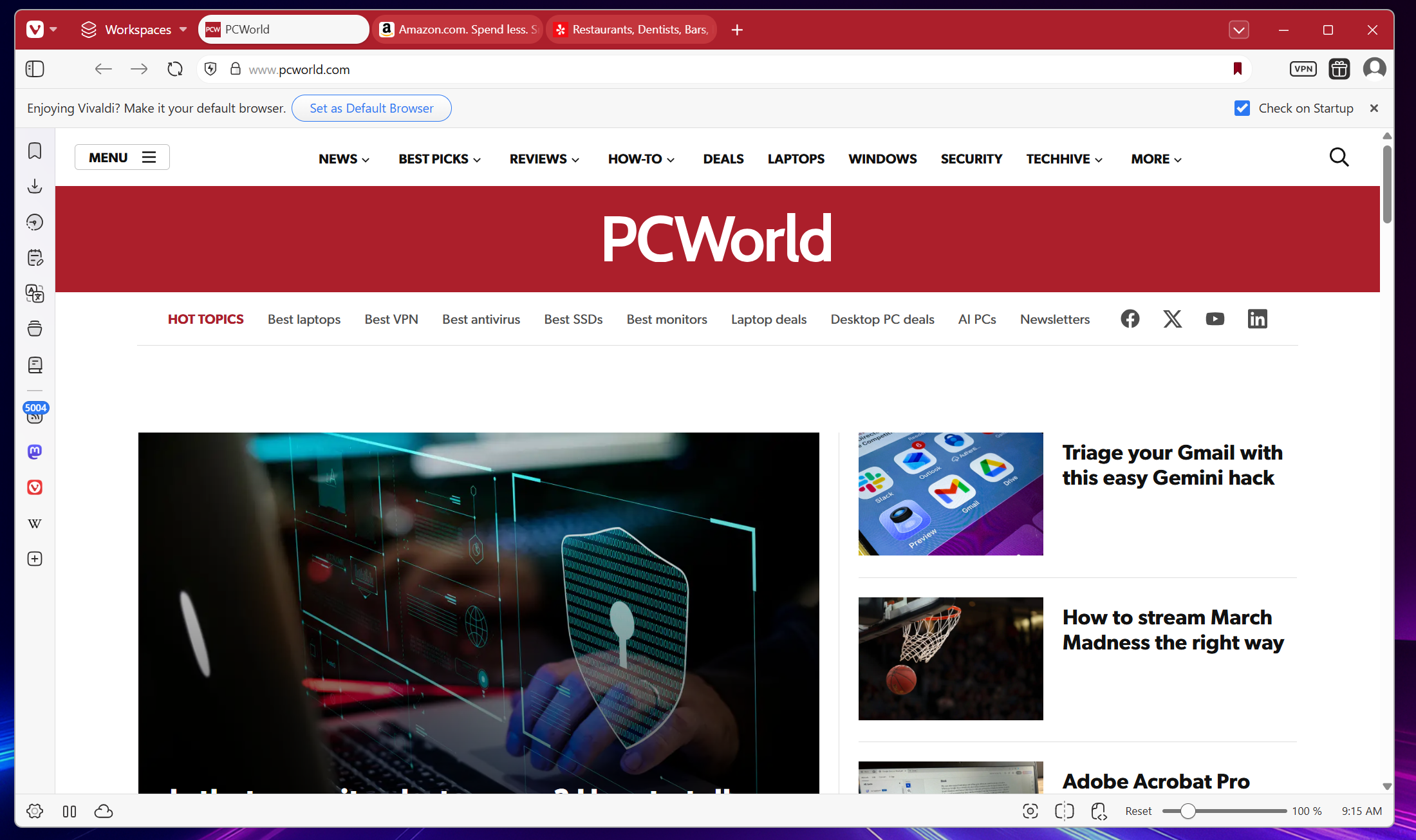
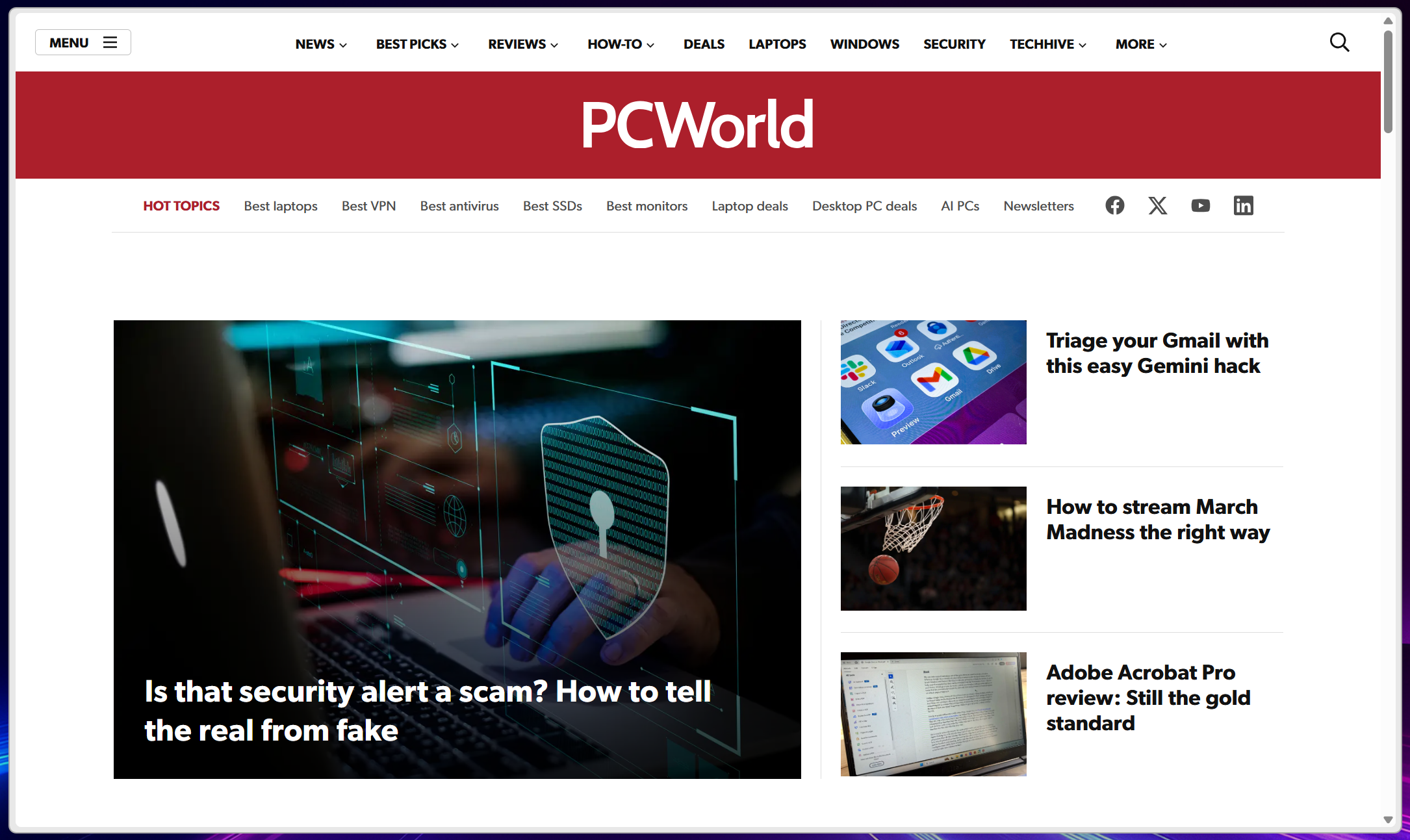
Before and after with Vivaldi’s new Auto-hide UI feature.
Vivaldi’s new feature takes this to an extreme, though you’ve been able to hide the bookmarks/Favorites element in Edge for years now. In 2023, the Arc browser also announced Boosts, which allowed you to manually remove elements from a website, such as the element that shows YouTube Shorts on YouTube. You’ll probably have to take some time getting used to the new features, but it’s just one of the smart feature additions Vivaldi has added to its latest iteration of its browser.
The other feature I’m going to have to play with is Follower Tabs, which are just another twist on a problem that Vivaldi and other browser makers keep wrestling with: You have a single tab, and then you click a link on it. You then click another, and another. Suddenly you have a row of tabs with no rhyme or reason, and you can’t follow the path back home to the original page.
When you right-click a link within Vivaldi 7.9, you have the option of opening a “tiled follower tab,” which opens the page in a tile to the right of your existing tab. It also drops down the tab and any followers into a second row of tabs at the top of your screen.
I’m a little less impressed with this feature, only because it doesn’t feel fully baked. Opening a tab, then a follower tab, makes sense. But when I opened a third tab, I expected it to appear in a collection of tiles, or just maybe a row of tiled windows with a slider bar at the bottom. Unless I used the feature incorrectly, that didn’t happen. I do like the way in which the origin tab and any followers appear in the additional row of tab bars. However, that’s another good reason to leave those tab bars visible, and not hidden via the UI auto-hide feature.
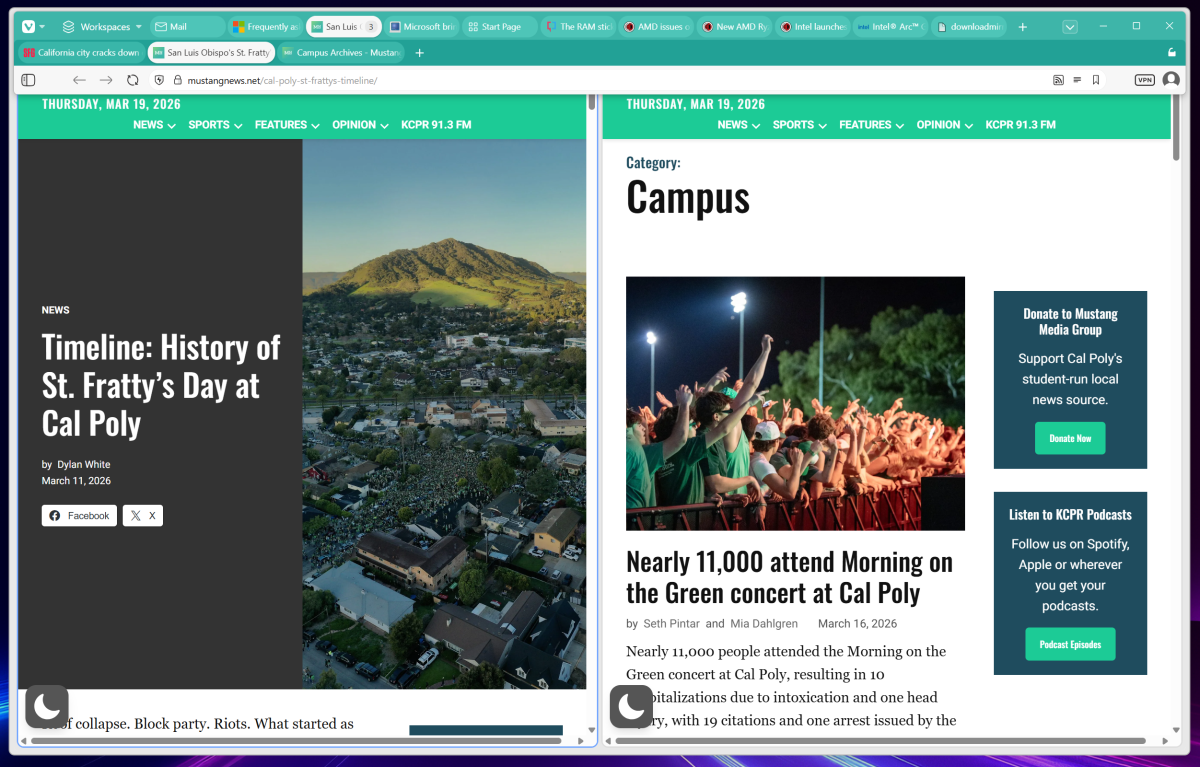
Follower tabs seem like a solid idea that might need a little iterative improvement.
Mark Hachman / Foundry
Finally, Vivaldi 7.9 now can treat the Mail composer as its own window. Again, that’s a useful little tweak.
Vivaldi has won fans at PCWorld; I use a dual-browser setup with Vivaldi and Edge, especially for Vivaldi’s integrated RSS feed reader but also for other reasons. However, that doesn’t mean that Vivaldi lacks its critics, too. Maybe it can work on a better sync experience, next?

Mark has written for PCWorld for the last decade, with 30 years of experience covering technology. He has authored over 3,500 articles for PCWorld alone, covering PC microprocessors, peripherals, and Microsoft Windows, among other topics. Mark has written for publications including PC Magazine, Byte, eWEEK, Popular Science and Electronic Buyers' News, where he shared a Jesse H. Neal Award for breaking news. He recently handed over a collection of several dozen Thunderbolt docks and USB-C hubs because his office simply has no more room.
Image: Mark Hachman / Foundry
Summary created by Smart Answers AI
In summary:
- PCWorld tests Vivaldi 7.9’s new auto-hide UI feature, which allows users to conceal browser elements like the address bar and bookmarks for a cleaner interface.
- The update introduces Follower Tabs for better organization by grouping related links in a tiled format, plus enables the Mail composer to function as a separate window.
- These innovative features offer improved customization and tab management, though users may need time to adapt to the new interface options.
With Vivaldi 7.9, the Scandinavian browser company makes a good point: Do you really need to see all of a browser’s visual cruft, all the time?
Vivaldi is launching UI auto-hide, a new feature that’s available within the free web browser in an upgrade that’s available today. It basically takes all the stuff you don’t always need to look at it, like the address bar, bookmarks, and side panel, and auto-hides it. It does to the browser what a Windows option does for the taskbar at the bottom of your screen, optionally hiding it if selected.
You’ll have to enter the Vivaldi Settings menu, then navigate to the Appearance tab. You’ll then have the option of turning off basically everything, or specific elements: the tab bar, the panel, the address bar, the status bar, and bookmarks. You can also set this behavior to default when opening a window in full screen mode.
That doesn’t mean that the UI is gone permanently. It’s merely hidden, so if you slide your mouse to the edge of the screen, everything pops back up again. I’ve tried the update, and the concept of hiding my browser tabs is a little disconcerting, so I think I’m going to leave those in. I’m torn on whether I should hide the URL bar, which also doubles as a search box in most browsers.
Before and after with Vivaldi’s new Auto-hide UI feature.
Vivaldi’s new feature takes this to an extreme, though you’ve been able to hide the bookmarks/Favorites element in Edge for years now. In 2023, the Arc browser also announced Boosts, which allowed you to manually remove elements from a website, such as the element that shows YouTube Shorts on YouTube. You’ll probably have to take some time getting used to the new features, but it’s just one of the smart feature additions Vivaldi has added to its latest iteration of its browser.
The other feature I’m going to have to play with is Follower Tabs, which are just another twist on a problem that Vivaldi and other browser makers keep wrestling with: You have a single tab, and then you click a link on it. You then click another, and another. Suddenly you have a row of tabs with no rhyme or reason, and you can’t follow the path back home to the original page.
When you right-click a link within Vivaldi 7.9, you have the option of opening a “tiled follower tab,” which opens the page in a tile to the right of your existing tab. It also drops down the tab and any followers into a second row of tabs at the top of your screen.
I’m a little less impressed with this feature, only because it doesn’t feel fully baked. Opening a tab, then a follower tab, makes sense. But when I opened a third tab, I expected it to appear in a collection of tiles, or just maybe a row of tiled windows with a slider bar at the bottom. Unless I used the feature incorrectly, that didn’t happen. I do like the way in which the origin tab and any followers appear in the additional row of tab bars. However, that’s another good reason to leave those tab bars visible, and not hidden via the UI auto-hide feature.
Follower tabs seem like a solid idea that might need a little iterative improvement.
Mark Hachman / Foundry
Finally, Vivaldi 7.9 now can treat the Mail composer as its own window. Again, that’s a useful little tweak.
Vivaldi has won fans at PCWorld; I use a dual-browser setup with Vivaldi and Edge, especially for Vivaldi’s integrated RSS feed reader but also for other reasons. However, that doesn’t mean that Vivaldi lacks its critics, too. Maybe it can work on a better sync experience, next?
Author: Mark Hachman, Senior Editor, PCWorld
Mark has written for PCWorld for the last decade, with 30 years of experience covering technology. He has authored over 3,500 articles for PCWorld alone, covering PC microprocessors, peripherals, and Microsoft Windows, among other topics. Mark has written for publications including PC Magazine, Byte, eWEEK, Popular Science and Electronic Buyers' News, where he shared a Jesse H. Neal Award for breaking news. He recently handed over a collection of several dozen Thunderbolt docks and USB-C hubs because his office simply has no more room.